
QuakeLive Custom HUD Install Guide
So, you want to use a custom HUD in QuakeLive and aren’t sure how? This is an easy to follow guide on how to get and install a custom HUD. Finding and using a custom HUD in QuakeLive is simple!
I originally wrote a HUD install guide almost 2 years ago during QuakeLive’s closed beta stage, but it wasn’t great and is a bit out dated now.
First, you need to choose which custom HUD you want to use. There is a pretty vast resource at Custom HUDs for Quake Live, with 342 HUDs so far. Here is a link to my author page on there. Browse through there and find something you like.
Once you’ve found and downloaded the zip of your custom HUD, extract it. There should be at least 2 files, hudname.cfg and hudname.menu (although some have more than one .menu).
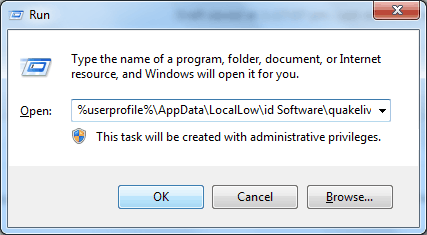
Go to your QuakeLive folder. If you’re not sure where that is, open Start, then Run, and paste in the location:
Windows Vista, Windows 7 or Windows 8(.1) (Standalone game): %userprofile%\AppData\LocalLow\id Software\quakelive\home\baseq3
Steam version: %ProgramFiles(x86)%\Steam\SteamApps\common\Quake Live\<yoursteamID>\baseq3
Windows XP (Standalone game): %appdata%\id Software\quakelive\home\baseq3
You need to make a new folder called ui in home\baseq3, and put these files (hudname.cfg and hudname.menu) inside. You should have something similar to below.

homebaseq3 folder. Make a folder called ‘ui’.
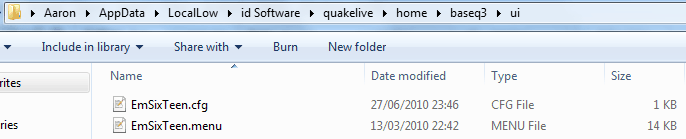
Your new ui folder, with custom HUD files inside.
Now all you need to do is load the custom HUD. If you use an autoexec.cfg, you can add the following line to it:
cg_hudFiles “ui/hudname.cfg”
The HUD should be loaded next time you start your game. Or if you are in-game, you can do the same followed by ;loadhud to load the HUD, like below.

Loading a HUD via console.
Congratulations, you should now have the custom HUD in-game!
Help, my HUD isn’t working! Troubleshooting:
If all you get is the default HUD loading again, something has gone wrong. This usually happens due to one of the following reasons:
- You have actually put your HUD files in the wrong place, or didn’t put the correct location in the cg_hudFiles cvar. Make sure they are in quakelive\home\baseq3\ui (home\baseq3 is where qzconfig.cfg is), and not in quakelive\baseq3 (where the map .pk3s are).
- Make sure the cg_hudFiles cvar has “ui/hudname.cfg” and not just “hudname.cfg”.
- If you renamed the hudname.menu file, you will need to edit hudname.cfg to reflect this, else it is looking for a file which doesn’t exist. Open hudname.cfg (Notepad will do fine) and edit the loadMenu line where your custom .menu is loaded to reflect the new name.
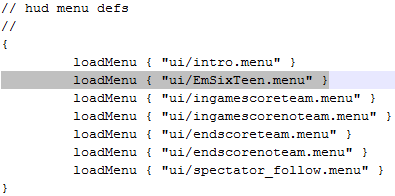
Make sure the .menu name is correct.
Any other questions or comments, feel free to leave a reply here. Or you contact me: EmSixTeen in #quakelive, #holysh1t or #esports.ie on Quakenet. Originally posted on my own blog.
23 comments
Leave a Reply
You must be logged in to post a comment.
Great update!
For a newbie such as I am, I don’t really know how to give any commands while in-game. So is there a specific button to open up a console with? Couldn’t find any that works nor could I find one from the settings.
Also it would be appreciated if you explained how this autoexec would work? I didn’t find such file from my folder.
Thanks!
Ah right, okay, I’ll edit that stuff in. It’s easy to overlook when you already know how!
Anyway, to put in commands whilst in-game you use a thing called console. To bring it down, press ctrl+alt+` (the button next to 1, on a US keyboard it’s ~ as far as I’m aware). After that you then put in the command. You’ll probably want to put in this following command, which will turn on console via one button press, ` (or ~):
com_allowconsole 1
As for autoexec.cfg, it isn’t there to begin with, you have to make this file. Do it with notepad, it’s just a text file, but when saving it just make sure it’s “autoexec.cfg” and not autoexec.cfg.txt. Any commands in this file are loaded automatically every time QuakeLive is started.
Is there some sort of bug or whatnot with the new Premium shit they got going?
After I bought premium my hud and config is all fubar.
Tried to uninstall everything, now I can’t find the path for the install e.i.
%userprofile%AppDataLocalLowid Softwarequakelivehomebaseq3
(im on vista)
Got any idea?
Could you do a mac guide also?
Your post assisted me during my university job in time. I think I will give my job next week.
It’s too difficult.Gonna wait for someone who will create some executable file.
I cannot mess with my PC like this,in case something gets wrong.
After long thinking,I did try but after typing into that Run thing in the PC,it asked me which program to use to open it..like Adobe,IE,Notepad etc.
It doesn’t work as I presumed.Nothing similar as you have above opened.
[…] Don’t know how to install one you’ve downloaded? Check out the Holy Shit Install Guide. […]
for installment on a mac.
extract to:
user/library/application support/Quakelive/quakelive/home/baseq3/ui
this the the patch where in Quakelive is on a MAC.
hope this helps you out..
flad
Doing some net browsing and noticed your blog looks a lttle bit screwed up in my K-meleon internet browser. Although luckily hardly anyone makes use of it anymore however you may want to look into it.
whats the command to save your current config? i know it exists
It’s writeconfig followed by a name
writeconfig nickname
Good stuff.
What if I want to use everything default from QL with the exception of a custom crosshair file?
I’ve been able to modify custom hud files but as far as getting the default HUD to work with only a custom crosshair, I cannot get it working.
Update: with the help of ‘Pikaluva’ here is the link to what I was asking for.
http://qlhud.core.ws/id/F3wo0Z
to help a little windows 7 users..
“Windows Vista/7: %userprofile%AppDataLocalLowid Softwarequakelivehomebaseq3”
there could be problem as appdata is hidden. open local disc, open users, open your user profile (there is usually a lock on it). you will not see folder “appdata” in it so add/type manualy “/appdata” after your userprofile in the navigation bar. press enter then follow the rest of instructions provided above..
and also..
i’ve had problems with making hud permanent. so easiest way to do it is to load it in-game according to the instructions above and then type “/writeconfig autoexec” in console as well
I cant found this baseq3 I am using windows 7
whats the command to save your current config? i know it exists
@eric31415
writeconfig yourconfig.cfg
hi. its my comment.
whats the command to save your current config? thanks.
windows 8??